
You know the drill. Perfect curve ahead, music playing, GPS giving you gentle cues… then silence. No music, no navigation, no connection to your riding buddies. Just the wind and your own cursing inside the helmet.
Welcome to the wonderful world of wireless tech on a motorcycle.
In this article, we guide you step by step through how to properly pair all your devices – and explain why things often go wrong. Based on our own KGL setup: BMW bike, Sena headset, Garmin GPS, and an iPhone. But we’ll also explain how this works with Android phones, Cardo headsets, and more.

Why correct pairing matters
Bluetooth is great… when it works. But many bikers struggle with pairing devices in the correct order, which leads to missing navigation prompts, a silent Siri, or apps that stop responding.
This guide will give you:
- Clear communication with your fellow riders
- Smooth voice assistant use (Siri/Google)
- Reliable navigation instructions
- Full control of music and calls
Base setup: smartphone, GPS, motorcycle & headset
Example (KGL setup):
- Motorcycle: BMW with TFT screen
- Headset: Sena
- GPS: Garmin
- Smartphone: iPhone
Common mistake:
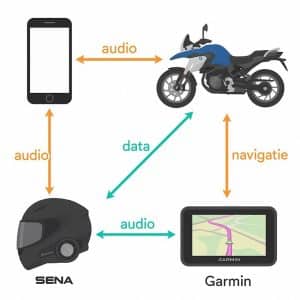
- iPhone paired to motorcycle
- Motorcycle paired to Sena
- Garmin paired to Sena
🔻 Result: music and calls work, but no Siri, no notifications, and Sena app won’t connect.
✅ Correct pairing order:
- 📱 Pair your iPhone directly to the Sena headset as Phone 1
- 🛰 Pair your Garmin GPS to the Sena using the GPS pairing mode
- 🖥 Pair your iPhone to the motorcycle TFT (for screen and button control)
- 🔁 Pair your motorcycle to the Sena as Phone 2
📱🔄 Does this work with Android & other brands?
Yes! Even though our example uses BMW + Sena + Garmin + iPhone, the logic is exactly the same for other setups:
- Use a Samsung or other Android? ➝ Same approach.
- Got a Cardo headset instead of Sena? ➝ Same logic.
- Ride a KTM, Yamaha or Honda with TFT? ➝ Pair phone to headset AND motorcycle, GPS to headset.
➡️ It’s not about the brand – it’s about how your devices function and communicate.
Intercom: Bluetooth vs Mesh
Bluetooth Intercom
- ✅ Energy-efficient
- ✅ Compatible with almost all headsets
- ❌ Max 3–4 riders
- ❌ Manual pairing required
- ❌ GPS/music often cut out during group talk
Mesh Intercom
- ✅ Up to 20+ riders
- ✅ Auto-reconnection
- ✅ Works simultaneously with GPS and phone
- ❌ Higher battery use
- ❌ Mesh-only headsets needed
🔧 At KGL, we prefer Mesh for group rides – one button, and everyone is connected.
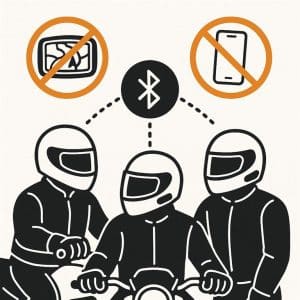
Common issue: “When 3 intercoms connect, everything else drops”
Situation:
Riding in a group of 3 with Bluetooth intercom. Once all are connected, GPS and music cut out.
Cause:
Headsets only have a limited number of Bluetooth channels. When all are used for intercom, there’s no room left for GPS or phone.
Solutions:
- ✅ Use Mesh for better multitasking
- ✅ Stick to 1-to-1 intercom only
- ✅ Adjust audio priorities in your headset settings
- ✅ Use visual GPS only (no audio)
📶 What drops when you connect too much?
Many riders only realize this mid-ride: you’re connected to your phone, your bike (TFT), and your GPS… and then you try to connect to a buddy without Mesh via Bluetooth intercom. Suddenly, either the GPS audio disappears or your TFT controls stop working. What’s happening?
📊 The technical background:
Headsets like the Sena-based SC2 (Schuberth) have a limited number of active Bluetooth channels:
-
Phone 1 – usually your smartphone
-
Phone 2 – typically your bike’s TFT system
-
GPS profile – a dedicated channel for navigation
-
Bluetooth intercom – also uses one Bluetooth slot
🔺 This means: if all three device channels are already in use, there’s no room left for an extra Bluetooth intercom connection. As soon as you try, the headset will drop one of the existing connections.
❓ What will drop?
Based on priority, here’s what typically happens:
-
GPS – navigation instructions disappear
-
Phone 2 (TFT) – handlebar and screen control stops
-
Phone 1 (smartphone) – always remains active (highest priority)
-
Intercom – stays active once connected
✅ Can you control what drops?
Not through a dedicated setting, but yes — by controlling the pairing order:
-
First, pair your smartphone (Phone 1)
-
Then your GPS
-
Then your motorcycle TFT (Phone 2)
-
Finally, connect to your Bluetooth intercom partner
➡️ This way, your headset will drop the least important device if it has to.
👉 Want to chat with your buddy without giving anything up?
Use Mesh intercom instead — it works on a separate protocol and won’t consume a Bluetooth channel.
❗ What Sena doesn’t tell you in the manual
Although Sena markets its headsets as “multi-device capable”, nowhere in the SC2 manual (or many others) does it explicitly state how many Bluetooth channels you can actively use at the same time.
You’ll find vague references like:
“You can pair a second mobile phone or GPS device…”
But it won’t say:
- Whether you can pair both a second phone and a GPS
- What connection will drop if all are active
- Or whether Siri and the Sena app will still work
🧪 What we found through testing
In the SC2 (Sena-based):
- Phone 1 (smartphone) ✅
- Phone 2 (TFT) ✅
- GPS ❌ → No room left when the above are connected
Only the Sena 50S/50R and 20S EVO models have a true separate GPS channel (via HFP) that allows:
- Phone 1 + Phone 2 + GPS → All three to work together
If you’re using the SC2 or similar, you’ll have to choose two out of three:
- Want Siri & app access? Drop TFT.
- Want GPS audio? Drop TFT or phone link.
👉 And this isn’t in the manual — you’ll only know by testing… or reading guides like this one. 😉
Who connects to what?
| Device | Connects to | Function |
|---|---|---|
| iPhone/Android | Sena/Cardo (Phone 1) | Voice, apps, music, calls |
| iPhone/Android | Motorcycle (TFT) | On-screen control |
| Garmin GPS | Sena/Cardo (GPS) | Turn-by-turn audio |
| Motorcycle TFT | Sena/Cardo (Phone 2) | Audio relay (lower priority) |
| Headset | Other riders | Intercom via Bluetooth or Mesh |
On-the-road tips
- 🔄 Test before departure: music, GPS, calls, voice assistant
- ⚙️ Update firmware (headset, GPS, motorcycle, phone)
- 🔋 Fully charge all devices
- 📲 Allow permissions in Android/iOS settings
- 🛑 Don’t try yelling “Hey Siri” on the highway without pairing first 😉
Final word: technology should help, not hinder
Tech on the bike is brilliant – when it works for you. Follow the steps above and you’ll ride connected, relaxed, and in full control. Whether you’re off to the Alps or just grabbing coffee, you’ll be ready for anything… even that third rider who always forgets to charge his headset.